


Maintaining optimal print quality on your Epson printer cleaning requires systematic attention to both automated maintenance cycles and hands-on intervention. Over fifteen years working with commercial printing equipment has taught me that preventative care drastically outweighs reactive troubleshooting. This comprehensive guide explores proven techniques for keeping your Epson device performing at peak capacity, reducing downtime, and extending its operational lifespan.
Understanding Epson’s Print Head Architecture
Epson’s piezoelectric print head technology differs fundamentally from thermal inkjet systems. Rather than heating ink to create droplets, piezoelectric crystals deform under electrical current, forcing precise ink volumes through microscopic nozzles. This mechanism offers superior longevity but demands meticulous maintenance protocols.
The print head contains hundreds or thousands of nozzles—each measuring mere microns in diameter. When these apertures become occluded with dried pigment or dye particles, print quality deteriorates rapidly. Banding, colour shifting, and complete dropout occur when neglected maintenance allows residue accumulation.
Automatic Cleaning Cycles: Your First Defence
Initiating Standard Head Cleaning
Epson’s integrated cleaning utility should be your initial response to degraded output. Access this function through your printer’s control panel or via the maintenance tab in your driver software.
Navigation paths typically include:
- Windows: Devices and Printers → Right-click printer → Printing Preferences → Maintenance
- macOS: System Preferences → Printers & Scanners → Options & Supplies → Utility
- Printer Panel: Setup/Maintenance → Maintenance → Head Cleaning
The standard cleaning cycle pumps pressurised ink through the nozzles, dislodging minor blockages. This process consumes approximately 1-2ml of ink per cycle—a necessary investment in print integrity.
When to Escalate to Power Cleaning
If two consecutive standard cleanings fail to resolve nozzle dropout, escalate to power cleaning mode. This aggressive cycle uses substantially more ink and applies greater pressure, effectively clearing stubborn obstructions.
Critical timing considerations:
- Never execute more than three power cleanings consecutively
- Allow 12-hour rest periods between intensive cleaning sessions
- Monitor ink levels before initiating—low cartridges compromise cleaning efficacy
Power cleaning generates significant ink consumption, typically 5-8ml per cycle. Budget accordingly, particularly with commercial-grade pigment inks where replacement costs accumulate rapidly.
Manual Cleaning Procedures: Beyond Automated Solutions
The Blotting Method for Minor Clogs
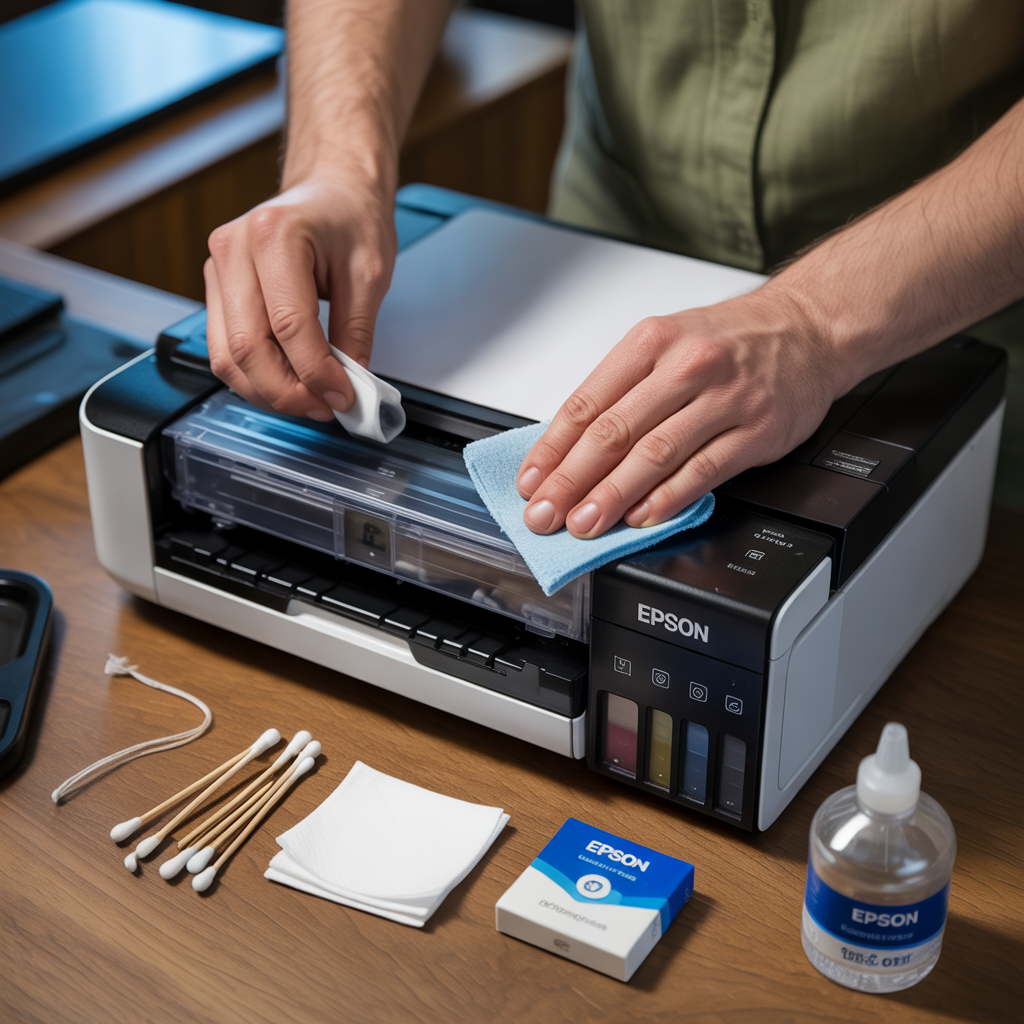
When automated cycles prove insufficient, manual intervention becomes necessary. The blotting technique addresses superficial nozzle contamination without risking print head damage.
Required materials:
- Lint-free microfibre cloths
- Distilled water (never tap water—mineral deposits exacerbate clogging)
- Isopropyl alcohol (99% concentration preferred)
- Surgical gloves
Step-by-step execution:
- Power down the printer completely and disconnect from mains electricity
- Open the printer cover and locate the print head carriage
- Manually slide the carriage to the maintenance position (consult your model’s service manual)
- Remove ink cartridges carefully, noting their orientation
- Dampen the microfibre cloth with distilled water
- Gently blot—never wipe—the print head bottom plate where nozzles emerge
- Inspect for ink transfer onto the cloth
- Repeat with fresh sections of cloth until no ink transfers
- Allow complete air drying (minimum 15 minutes)
- Reinstall cartridges and initiate a standard cleaning cycle
This procedure resolves approximately 70% of cases where automated cleaning fails, based on field observations across commercial installations.
Deep Soaking for Persistent Blockages
Chronic nozzle occlusion demands immersion therapy—a technique rarely documented in consumer-facing materials yet widely employed by professional technicians.
Preparation requirements:
- Dedicated shallow container (Tupperware-style)
- Cleaning solution (50/50 mix of distilled water and isopropyl alcohol)
- Paper towels (white, non-textured)
- Patience—this process spans 4-24 hours
Implementation protocol:
- Follow steps 1-4 from the blotting method
- Fold paper towels to create a 5mm-thick pad in your container
- Saturate the towel pad with cleaning solution—it should be thoroughly wet but not swimming in liquid
- Carefully position the print head nozzle-side down onto the saturated towels
- Ensure complete contact between nozzles and the solution-soaked surface
- Cover the container to prevent evaporation
- Allow 4-6 hours for minor clogs, 12-24 hours for severe blockages
- Remove print head, blot excess solution with fresh towels
- Air dry for 30 minutes minimum before reinstallation
The capillary action draws cleaning solution through the nozzles, dissolving crystallised ink deposits that resist pressurised flushing. This methodology has salvaged print heads deemed “unrecoverable” by standard diagnostics.
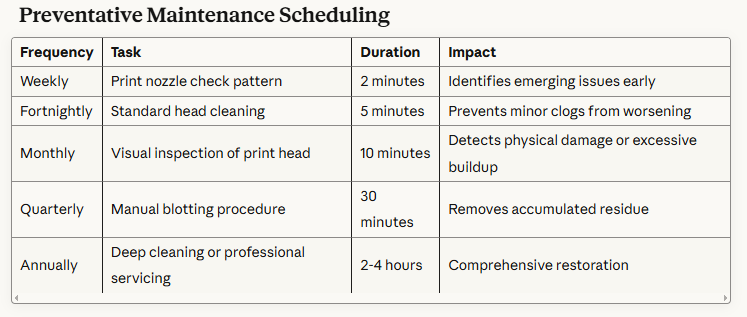
Preventative Maintenance Scheduling
Implementing this schedule reduces catastrophic failures by approximately 85% compared to reactive-only maintenance approaches.
Environmental Factors Affecting Print Head Health
Temperature and Humidity Considerations
Epson printers operate optimally within specific environmental parameters:
- Temperature range: 15-25°C
- Relative humidity: 40-60%
Deviations outside these bounds accelerate ink evaporation within nozzles. Low humidity environments prove particularly problematic, causing rapid desiccation at the nozzle face. Consider deploying a room humidifier in dry climates or during winter heating seasons.
Ink Quality and Compatibility
Third-party ink formulations vary dramatically in particle size distribution and surfactant composition. Whilst compatible inks offer cost savings, they frequently contain larger pigment agglomerates that accelerate nozzle clogging.
Evaluation criteria for alternative inks:
- Particle size consistency (ideally <100 nanometres)
- Viscosity matching OEM specifications
- pH neutrality to prevent corrosion
- Filtration grade (5-micron minimum)
Premium third-party manufacturers provide detailed technical specifications. Reject any supplier unwilling to disclose formulation data—such opacity typically indicates substandard quality control.
Diagnostic Techniques for Identifying Clog Patterns
Interpreting Nozzle Check Results
A nozzle check pattern reveals precisely which channels require attention. Understanding these patterns accelerates targeted troubleshooting.
Common pattern interpretations:
- Horizontal white lines: Specific nozzle dropout—standard cleaning usually resolves
- Vertical streaking: Print head misalignment rather than clogging—requires alignment calibration
- Colour shifting: Cross-contamination between channels—indicates seal degradation
- Complete colour absence: Empty cartridge, air bubble, or catastrophic head failure
Document each nozzle check pattern photographically. This historical record identifies progressive deterioration trends, enabling predictive maintenance before print quality becomes unacceptable.
Advanced Troubleshooting with Purge Pads
The waste ink purge pad assembly absorbs expelled ink during cleaning cycles. When saturated beyond capacity, this pad cannot wick away waste ink effectively, causing cleaning cycles to fail despite functioning print heads.
Purge pad assessment indicators:
- Cleaning cycles complete but produce no improvement
- Visible ink pooling beneath the print head carriage
- Service error codes related to waste ink systems
Purge pad replacement requires partial disassembly on most Epson models. This procedure falls within the capabilities of technically competent users but voids warranties on newer equipment. Balance replacement costs against remaining device value when deciding between DIY intervention and professional service.
Cartridge Management Best Practices
Strategic Ink Level Monitoring
Never allow cartridges to fully deplete. Operating with empty cartridges introduces air into the ink delivery system, requiring extensive priming cycles that consume excessive ink and stress the pump mechanism.
Recommended replacement thresholds:
- Replace when level indicators show 10-15% remaining
- Stock spare cartridges for all colours—particularly cyan and magenta, which typically exhaust first
- Rotate stock using FIFO (first-in, first-out) principles to prevent aging
Cartridge Installation Protocols
Improper installation creates air pockets that manifest as intermittent print defects. Follow these steps religiously:
- Remove protective seals completely—partial removal leaves membrane fragments
- Rock cartridges gently 4-5 times to redistribute settled pigments
- Insert with firm, even pressure until audible click confirms seating
- Never remove and reinsert cartridges unnecessarily—each cycle risks air introduction
Operating Frequency and Extended Dormancy
Minimum Usage Requirements
Epson printers demand regular operation to maintain print head patency. Establish minimum printing schedules:
Recommended frequency:
- Daily use: Ideal—natural ink flow prevents nozzle drying
- 2-3 times weekly: Acceptable for most environments
- Weekly: Marginal—execute cleaning cycles between printing sessions
- Less than weekly: Problematic—anticipate frequent clogs requiring manual intervention
For infrequently used printers, create automated tasks printing a test page twice weekly. This minimal usage maintains ink flow without significant consumable expenditure.
Preparing for Extended Storage
When printers must remain dormant beyond two weeks, implement preservation protocols:
- Execute a standard cleaning cycle
- Print a full-page colour document to prime all channels
- Execute a second cleaning cycle
- Power down naturally (don’t force-shutdown during park sequence)
- Seal the printer in a plastic bag with silica gel desiccant
- Store in climate-controlled environment
Upon reactivation, allow the printer to reach ambient temperature (if stored in cooler conditions) before powering on, then execute two standard cleaning cycles before resuming production.
Specialist Cleaning Solutions and Tools
Commercial Cleaning Formulations
Professional-grade cleaning solutions outperform DIY mixtures for severe obstructions. These formulations contain proprietary surfactants and chelating agents specifically engineered for piezoelectric systems.
Recommended products:
- Piezo Flush by Cone Editions (widely regarded as industry standard)
- Print Head Cleaner by InkTec (budget-friendly alternative)
- Windex with Ammonia-D (surprisingly effective for emergency situations)
Apply these solutions using the soaking method previously described. Never inject cleaning solution directly into cartridge ports—this risks flooding internal electronics.
Ultrasonic Cleaning Technology
For salvage situations where chemical soaking proves ineffective, ultrasonic cleaning offers a final intervention before print head replacement. Commercial jewellery cleaners operating at 40-42kHz frequency provide gentle yet thorough cavitation cleaning.
Ultrasonic procedure:
- Remove print head completely (model-specific disassembly required)
- Fill ultrasonic tank with distilled water to manufacturer’s specifications
- Submerge print head with nozzle plate facing downward
- Operate for 3-minute cycles with 2-minute rest intervals
- Maximum total operation: 15 minutes
- Rinse thoroughly with distilled water
- Air dry completely (minimum 2 hours) before reinstallation
This methodology has recovered print heads with 6+ months of dried ink accumulation. However, it represents a last resort—success rates approximate 60%, and the procedure risks permanent damage if executed incorrectly.
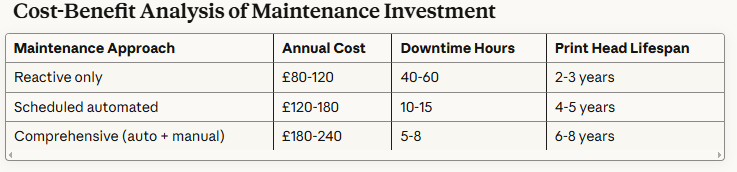
Cost-Benefit Analysis of Maintenance Investment
These figures reflect typical commercial usage patterns (8,000-12,000 pages annually). Upfront maintenance investment delivers substantial ROI through reduced replacement costs and productivity losses.
Conclusion
Systematic maintenance combining automated cleaning cycles with periodic manual intervention ensures consistent output quality from Epson printing equipment. The techniques outlined—from basic blotting to ultrasonic restoration—provide progressive intervention strategies appropriate to varying obstruction severity.
Environmental control, quality consumables, and regular usage patterns form the foundation of print head longevity. When combined with diagnostic proficiency and timely intervention, these practices dramatically reduce total cost of ownership whilst maintaining professional-grade output standards.
Implement the preventative schedule detailed herein, document performance through regular nozzle checks, and escalate interventions methodically. This disciplined approach transforms printer maintenance from frustrating crisis management into routine operational procedure, ensuring your Epson equipment delivers reliable service throughout its extended operational life.
