

The HP 953 cartridge ecosystem experienced a seismic shift on 25th July 2024 when Hewlett-Packard deployed firmware version 2423A through wireless connectivity protocols. This HP 953 Firmware Update seemingly innocuous over-the-air update triggered a cascade of authentication failures for third-party consumables, leaving thousands of UK businesses and home users staring at error messages rather than printed documents. Understanding this technical watershed moment—and the solutions available—has never been more critical for organisations seeking to maintain printing continuity whilst managing expenditure prudently.
Understanding the July 2024 Firmware Deployment
HP’s wireless firmware propagation mechanism operates silently, often executing updates during printer idle periods without explicit user authorisation. The 2423A firmware iteration introduced enhanced cryptographic validation protocols specifically targeting the authentication handshake between printer logic boards and cartridge integrated circuits. This represents a continuation of HP’s dynamic security strategy, which they position as intellectual property protection whilst critics characterise it as planned obsolescence enforcement.
What the 2423A Update Actually Changed
The firmware modification centred on chip authentication algorithms. Previously, cartridges utilising chip code A71 and antecedent versions could successfully complete the initialisation sequence. Post-update, these same chips encountered fatal recognition failures. The printer’s embedded software now demands a more sophisticated cryptographic response—one that earlier chip architectures simply cannot provide.
Key Technical Parameters:
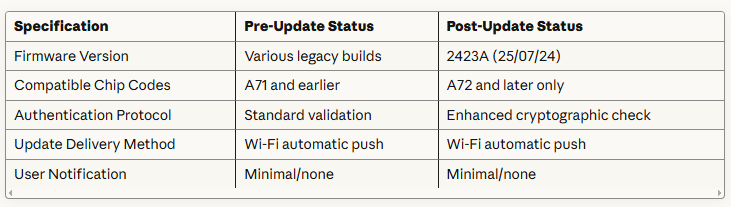
This table crystallises the transformation. What functioned flawlessly on 24th July became obsolete by the 26th—a timeline that exemplifies the fragility of modern consumables ecosystems.
Which Printers Were Affected?
The entire HP OfficeJet Pro 8000 series constellation utilising 953 and 953XL cartridges fell within the update’s purview. This encompasses:
- OfficeJet Pro 8210
- OfficeJet Pro 8710
- OfficeJet Pro 8715
- OfficeJet Pro 8720
- OfficeJet Pro 8725
- OfficeJet Pro 8730
- OfficeJet Pro 8740
These workhorses populate countless UK SMEs, solicitors’ offices, accountancy practices, and educational establishments. The ripple effect of authentication failures extended far beyond simple inconvenience—it threatened business continuity for organisations operating on tight margins.
The Compatible Cartridge Conundrum
Third-party ink cartridge manufacturers engineer their products through meticulous reverse-engineering of HP’s proprietary chip technology. This involves analysing electrical signatures, communication protocols, and cryptographic handshakes. When HP modifies these parameters, it precipitates an immediate compatibility rupture.
Why A71 Chips Failed
Chip code A71 represented the prevailing standard across compatible cartridge manufacturing until mid-2024. These chips contained firmware capable of mimicking HP’s authentication dialogue sufficiently to satisfy pre-2423A validation routines. However, they lacked the computational sophistication required by enhanced cryptographic challenges.
Think of it as possessing a perfectly valid passport that suddenly doesn’t match new biometric scanner requirements. The document remains genuine, but the verification infrastructure has evolved beyond its capabilities.
The A72 Solution Architecture
Progressive manufacturers had already begun deploying A72-generation chips before the 25th July precipice. These advanced integrated circuits incorporate:
- Enhanced cryptographic response algorithms: Capable of generating authentication tokens that satisfy 2423A validation requirements
- Future-proofed architecture: Designed with headroom for subsequent firmware iterations
- Backward compatibility: Functional with legacy firmware versions, ensuring universal applicability
- Improved thermal management: Better suited to high-volume printing environments
For organisations that transitioned to A72-equipped cartridges prophylactically, the update proved entirely transparent—a non-event rather than a crisis.
Protecting Your Printing Infrastructure
Fifteen years navigating the printing industry’s technological tides has instilled one immutable principle: control firmware updates or they will control you. Automatic update mechanisms serve manufacturers’ strategic interests, not necessarily end-users’ operational requirements.
Disabling Automatic Firmware Updates: Step-by-Step
Implementing update controls requires accessing your printer’s embedded web server. Here’s the definitive procedure:
Step 1: Identify Your Printer’s IP Address
Navigate to the printer’s front panel menu. Select ‘Network’ or ‘Wireless’ settings, then locate ‘Network Configuration’ or ‘Print Network Configuration Page’. The IP address appears prominently on this report—typically formatted as 192.168.x.x.
Step 2: Access the Embedded Web Server (EWS)
Launch your web browser and enter the IP address into the address bar. Press Enter. The printer’s administrative interface should load—this is the EWS, your gateway to granular control.
Step 3: Navigate to Firmware Update Settings
Within the EWS interface:
- Locate the ‘Settings’ or ‘Tools’ tab
- Find ‘Product Updates’, ‘Firmware Updates’, or ‘Web Services’ submenu
- Identify the ‘Automatic Updates’ toggle or checkbox
Step 4: Disable Automatic Updates
Deselect or toggle off any options labelled:
- “Check for product updates automatically”
- “Allow HP to download updates”
- “Install updates automatically”
Step 5: Apply and Verify
Click ‘Apply’ or ‘Save’. Navigate back through the menus to confirm your changes persisted. Some printer models require a power cycle (complete shutdown and restart) for settings to take effect.
Critical Consideration: Disabling updates doesn’t compromise security if you’re using quality third-party cartridges. Original HP consumables remain functional regardless of update status, and modern compatible cartridges from reputable suppliers incorporate security measures that obviate manufacturer updates.
What If You’ve Already Updated?
Discovering your printer has surreptitiously installed 2423A firmware need not precipitate panic. Several remediation pathways exist:
Option 1: Upgrade to A72-Generation Cartridges
The most straightforward resolution involves acquiring compatible cartridges equipped with A72 or later chip codes. These integrate seamlessly with 2423A firmware, restoring full functionality immediately upon installation.
Option 2: Firmware Downgrade (Advanced)
Technically proficient users can attempt firmware regression, reverting to pre-2423A versions. However, this procedure carries substantial risks:
- Potential warranty voidance
- Printer bricking if interrupted
- Time-intensive troubleshooting
For most organisations, this represents an imprudent risk-reward calculation.
Option 3: Utilise Updated Compatible Cartridges
Forward-thinking suppliers responded to the 2423A challenge by engineering new firmware for their cartridge chips. These enhanced consumables overcome HP’s authentication modifications whilst maintaining cost advantages over original equipment manufacturer (OEM) products.
The Economics of Compatible Cartridges
Understanding the firmware update landscape requires contextualising the economic imperatives driving both HP’s actions and the compatible cartridge market’s existence.
Cost Comparison Analysis

These differentials compound dramatically across organisational lifespans. A modest office printing 1,000 pages monthly can realise £400-600 annual savings through compatible cartridge adoption—capital that can be redeployed towards growth initiatives rather than consumables.
Total Cost of Ownership Considerations
Savvy procurement professionals evaluate printing expenditure holistically, encompassing:
- Initial cartridge acquisition cost: The upfront purchase price
- Page yield performance: Actual pages produced per cartridge
- Print quality consistency: Colour accuracy and text sharpness maintenance
- Reliability metrics: Failure rates and warranty provisions
- Administrative overhead: Time spent managing cartridge issues
Premium compatible cartridges from established suppliers often match or exceed OEM performance across these parameters whilst maintaining substantial cost advantages. The key lies in supplier selection—distinguishing between bargain-basement offerings and professionally engineered alternatives.
Industry Perspective: The Firmware Update Arms Race
Having witnessed countless firmware-driven disruptions over fifteen years, a pattern emerges. Printer manufacturers implement authentication enhancements periodically, compatible cartridge manufacturers engineer countermeasures, and the cycle perpetuates. This technological dialectic shows no signs of abating.
Why Manufacturers Update Firmware
HP’s stated rationale emphasises:
- Security enhancement: Protecting against counterfeit cartridges containing malicious code
- Quality assurance: Ensuring optimal print performance
- Intellectual property protection: Defending patented technologies
Critics counter that the primary motivation involves protecting high-margin consumables revenue. Printer hardware often sells at or below manufacturing cost, with profitability deriving from captive consumables sales—the proverbial “razors and blades” business model.
The Compatible Market Response
Reputable third-party manufacturers invest heavily in research and development, maintaining parity with OEM authentication requirements. The A72 chip generation exemplifies this reactive capability—engineered, tested, and deployed within weeks of the 2423A update’s emergence.
This technological agility stems from specialisation. Whilst HP develops printers, scanners, computers, and myriad other products, compatible cartridge manufacturers focus exclusively on consumables engineering. This concentrated expertise enables rapid response to authentication modifications.
Practical Recommendations for UK Businesses
Synthesising fifteen years of industry observation into actionable guidance yields several strategic imperatives:
Immediate Actions
Audit Your Current Firmware Status
Print a configuration page from each HP 953-series printer in your fleet. Firmware version appears prominently—if it reads 2423A, you’re operating the problematic iteration.
Verify Cartridge Chip Codes
Examine cartridges currently installed or in inventory. Reputable suppliers clearly mark chip generation on packaging. A71 cartridges require replacement or will fail upon next installation; A72 cartridges remain viable.
Disable Automatic Updates
Follow the procedure outlined earlier for every networked printer. This prevents future unauthorised firmware modifications.
Medium-Term Strategy
Establish Supplier Relationships
Identify compatible cartridge suppliers with demonstrated responsiveness to firmware updates. Request documentation of their chip update protocols and quality assurance processes.
Implement Inventory Management
Maintain modest cartridge stocks (2-3 sets per printer) to buffer against supply chain disruptions whilst avoiding capital tie-up in potentially obsolete inventory.
Monitor Industry Developments
Subscribe to printing industry newsletters or supplier communications to receive advance warning of firmware update campaigns.
Long-Term Considerations
Evaluate Next-Generation Printing Technologies
Continuous ink supply systems (CISS) or ink tank printers eliminate cartridge authentication entirely, though they require different usage patterns and maintenance protocols.
Calculate Total Cost of Ownership
When replacing printers, factor consumables costs over the device’s anticipated lifespan. A £200 printer with £400 annual cartridge expenditure proves less economical than a £350 printer with £150 annual consumables costs.
Diversify Printing Infrastructure
Avoid single-vendor dependency. Maintaining a mixed fleet (HP, Epson, Canon) reduces vulnerability to manufacturer-specific firmware disruptions.
The Cynopack Response: Engineering Solutions
Addressing the 2423A challenge required mobilising technical resources rapidly. Within days of identifying the authentication failure pattern, engineering teams commenced chip firmware development. The result: updated cartridges capable of satisfying enhanced validation requirements whilst maintaining the cost efficiency that makes compatible consumables attractive.
This new firmware iteration undergoes rigorous testing protocols:
- Authentication verification: Confirming successful handshakes with 2423A firmware
- Print quality assessment: Ensuring colour accuracy and text sharpness match or exceed OEM standards
- Longevity testing: Accelerated aging simulations predicting real-world performance
- Compatibility validation: Testing across all OfficeJet Pro 8000 series variants
Every cartridge dispatched incorporates this enhanced firmware, guaranteeing customers receive 2423A-compatible consumables without requesting upgraded versions or paying premium pricing.
Understanding Chip Technology Evolution
The progression from basic identification chips to sophisticated cryptographic processors reflects the broader evolution of consumables security. Early cartridge chips simply communicated ink level information. Modern iterations function as miniature computers, executing complex authentication dialogues.
Chip Architecture Components
Contemporary cartridge chips incorporate:
Memory Modules: Storing ink level data, authentication credentials, and usage history
Microprocessors: Executing cryptographic algorithms and managing communication protocols
Interface Circuits: Handling electrical connections with printer logic boards
Security Features: Implementing encryption and anti-tampering measures
This complexity explains why firmware updates can render existing chips obsolete—the computational demands of new authentication protocols exceed older chips’ processing capabilities.
Future-Proofing Considerations
The A72 chip generation incorporates architectural headroom, anticipating future authentication enhancements. This forward-looking design philosophy aims to extend compatibility windows, reducing the frequency of forced cartridge obsolescence.
However, no chip design can anticipate all possible authentication modifications indefinitely. The firmware update arms race continues, with manufacturers and compatible cartridge engineers locked in perpetual technological one-upmanship.
Environmental and Sustainability Dimensions
The premature obsolescence of functional cartridges carries environmental implications that warrant consideration. Perfectly serviceable A71-equipped cartridges becoming e-waste due solely to authentication failures contradicts sustainability principles.
The Circular Economy Argument
Advocates of compatible cartridges emphasise:
- Extended product lifecycles: Enabling printer functionality beyond manufacturer-imposed obsolescence
- Reduced electronic waste: Preventing functional cartridges from entering landfills
- Resource efficiency: Maximising utility extraction from manufactured goods
Critics counter that unregulated third-party cartridges may lack recycling programmes, though many reputable suppliers now offer take-back schemes rivalling OEM provisions.
Regulatory Landscape
UK and EU regulations increasingly favour right-to-repair and anti-planned-obsolescence measures. The Competition and Markets Authority has scrutinised printer manufacturers’ consumables practices, though concrete regulatory constraints remain nascent.
This evolving legal framework may eventually limit manufacturers’ ability to impose arbitrary authentication requirements, though such developments unfold over years rather than months.
Frequently Asked Questions
1. Will the July 2024 firmware update affect my HP 953 printer if I use original HP cartridges?
Original HP cartridges remain fully compatible with firmware version 2423A. The update specifically targets third-party cartridge authentication protocols, leaving genuine HP consumables unaffected. If you exclusively use OEM cartridges, the firmware update causes no functionality disruption.
2. How can I identify which chip code my compatible cartridges use?
Reputable suppliers print chip generation information on cartridge packaging. Look for markings such as “Chip Version A72” or similar designations. If packaging lacks this information, contact your supplier directly—they should readily provide chip code specifications for their products.
3. Is it legal to use compatible cartridges in my HP printer?
Absolutely. UK and EU competition law protects consumers’ rights to use third-party consumables. Printer manufacturers cannot void warranties solely due to compatible cartridge usage, provided those cartridges haven’t caused demonstrable damage. This principle was established through multiple legal precedents and regulatory guidance.
4. Can I revert my printer to older firmware after the 2423A update?
Firmware downgrading is technically possible but complex and risky. It typically requires specialised software, precise procedural execution, and acceptance of warranty voidance risks. For most users, upgrading to A72-compatible cartridges represents a safer, more practical solution than attempting firmware regression.
5. How often does HP release firmware updates for the 953 series?
HP deploys firmware updates irregularly, with intervals ranging from several months to over a year. These updates may address security vulnerabilities, enhance functionality, or modify authentication protocols. The unpredictable timing underscores the importance of disabling automatic updates if you use compatible cartridges.
6. Will A72 cartridges work with older firmware versions?
Yes. A72-generation chips maintain backward compatibility with legacy firmware iterations. This ensures they function correctly regardless of whether your printer operates 2423A firmware or earlier versions—a crucial advantage for organisations managing mixed-fleet firmware statuses.
7. What happens if I install an A71 cartridge after the firmware update?
The printer will display an error message indicating cartridge recognition failure. Common notifications include “Cartridge Problem”, “Incompatible Cartridge”, or “Non-HP Chip Detected”. The printer will refuse to print until you replace the A71 cartridge with either an A72-equipped compatible cartridge or an original HP consumable.
8. Do all compatible cartridge suppliers offer A72-updated chips?
No. Only suppliers with robust engineering capabilities and responsive R&D processes can develop and deploy updated chip firmware rapidly. When selecting suppliers, verify they’ve specifically addressed the 2423A update—this demonstrates technical competence and customer commitment.
9. Are there any disadvantages to disabling automatic firmware updates?
Disabling updates means foregoing potential feature enhancements or security patches HP releases. However, for users of compatible cartridges, maintaining firmware control outweighs these theoretical benefits. Printers rarely receive transformative functionality through updates, and security concerns primarily affect enterprise network environments rather than standalone office devices.
10. How can I verify my printer’s current firmware version?
Access the printer’s front panel menu and navigate to ‘Setup’, ‘Tools’, or ‘Settings’. Look for ‘Printer Information’, ‘About’, or ‘Firmware Version’. Alternatively, print a configuration report through the menu system—firmware version appears prominently on this document. You can also check through the embedded web server by entering your printer’s IP address into a web browser.