
Epson 604XL ink cartridges are used by ten selected Epson Expression Home and WorkForce printers: the XP-2200, XP-2205, XP-3200, XP-3205, XP-4200, XP-4205, WF-2910DWF, WF-2930DWF, WF-2935DWF and WF-2950DWF.
These models use the Epson 604 Pineapple cartridge family and accept both standard-capacity 604 and high-capacity 604XL cartridges. They require four individual colours: black, cyan, magenta and yellow.
This guide provides the complete compatibility list, cartridge codes, estimated page yields and links to the correct Cynopack products and printer-specific ink pages.
Which Printers Use Epson 604XL Ink
Epson 604XL-Compatible Printers at a Glance
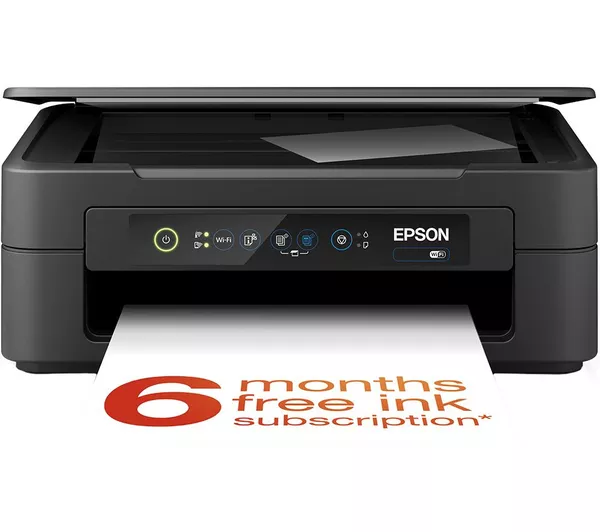
| Printer range | Compatible model | Printer-specific ink page |
|---|---|---|
| Epson Expression Home | XP-2200 | Epson XP-2200 ink cartridges |
| Epson Expression Home | XP-2205 | Epson XP-2205 ink cartridges |
| Epson Expression Home | XP-3200 | Epson XP-3200 ink cartridges |
| Epson Expression Home | XP-3205 | Epson XP-3205 ink cartridges |
| Epson Expression Home | XP-4200 | Epson XP-4200 ink cartridges |
| Epson Expression Home | XP-4205 | Epson XP-4205 ink cartridges |
| Epson WorkForce | WF-2910DWF | Epson WF-2910DWF ink cartridges |
| Epson WorkForce | WF-2930DWF | Epson WF-2930DWF ink cartridges |
| Epson WorkForce | WF-2935DWF | Epson WF-2935DWF ink cartridges |
| Epson WorkForce | WF-2950DWF | Epson WF-2950DWF ink cartridges |
Compatibility depends on the complete printer model. Do not assume that every Epson XP or WF printer uses 604XL ink.
What Is Epson 604XL Pineapple Ink?
Epson uses identifying images and family names to help customers distinguish between cartridge ranges. The 604 and 604XL family is commonly known as Pineapple ink.
The family contains four separate cartridges:
- Black
- Cyan
- Magenta
- Yellow
Using individual colours allows the printer to replace a recorded empty cartridge without requiring the other usable colours to be discarded.
Standard 604 and 604XL cartridges belong to the same supported printer family. The XL versions contain more ink and have higher estimated page yields, but they do not fit more printer models simply because they are labelled “XL”.
The Epson 604 range combines pigment black ink with dye-based colour inks. Pigment black is intended for defined text, while cyan, magenta and yellow are combined to produce colour documents, graphics and photographs.
Complete List of Printers That Use Epson 604XL Ink
Epson Expression Home XP-2200
The Epson Expression Home XP-2200 is a compact A4 multifunction printer offering printing, scanning and copying. It uses four individual 604 or 604XL Pineapple cartridges.
Customers who print regularly may prefer the higher expected yield of compatible 604XL ink. Individual colours are useful when only one cartridge needs replacing, while the four-colour multipack provides a complete set.
See the dedicated Epson XP-2200 ink-cartridge page for compatible products, installation instructions and model-specific troubleshooting.
Epson Expression Home XP-2205
The Epson Expression Home XP-2205 also uses standard 604 and high-capacity 604XL cartridges. Its compatible colours are black, cyan, magenta and yellow.
Check the complete model number before ordering because the XP-2205 cartridge requirement should not be assumed from the “XP” prefix alone.
Browse the Epson XP-2205 ink-cartridge page for the relevant individual colours and multipack.
Epson Expression Home XP-3200
The Epson Expression Home XP-3200 accepts the Epson 604/604XL Pineapple cartridge family. The printer’s individual-cartridge system allows black, cyan, magenta and yellow to be replaced separately.
View the Epson XP-3200 ink-cartridge page to find the compatible 604XL options.
Epson Expression Home XP-3205
The Epson Expression Home XP-3205 uses the same 604 and 604XL Pineapple family. Both standard and XL capacities are intended for this supported model.
Use the Epson XP-3205 ink-cartridge page to compare the compatible colours and four-cartridge pack.
Epson Expression Home XP-4200
The Epson Expression Home XP-4200 requires four individual cartridges from the 604 Pineapple range. Compatible 604XL options offer a higher estimated page yield than standard 604 cartridges.
Find the available products through the Epson XP-4200 ink-cartridge page.
Epson Expression Home XP-4205
The Epson Expression Home XP-4205 is the sixth Expression Home model in this compatibility group. It accepts black, cyan, magenta and yellow cartridges in standard 604 or high-capacity 604XL versions.
Visit the Epson XP-4205 ink-cartridge page for model-specific product links and guidance.
Epson WorkForce WF-2910DWF
The Epson WorkForce WF-2910DWF uses Epson 604 and 604XL Pineapple cartridges. Record the complete model, including the DWF suffix, when checking compatibility.
Browse the Epson WF-2910DWF ink-cartridge page for compatible individual colours and the multipack.
Epson WorkForce WF-2930DWF
The Epson WorkForce WF-2930DWF also uses four separate cartridges from the 604/604XL family. High-capacity 604XL cartridges can reduce replacement frequency for customers who print regularly.
See the dedicated Epson WF-2930DWF ink-cartridge page.
Epson WorkForce WF-2935DWF
The Epson WorkForce WF-2935DWF is compatible with standard 604 and high-capacity 604XL Pineapple ink. It is important to check the full WF-2935DWF designation rather than relying on part of the model number.
Find the appropriate ink through the Epson WF-2935DWF ink-cartridge page.
Epson WorkForce WF-2950DWF
The Epson WorkForce WF-2950DWF completes the current group of ten supported models. It uses individual black, cyan, magenta and yellow 604 or 604XL cartridges.
Visit the Epson WF-2950DWF ink-cartridge page for compatible product options.
Which Epson 604XL Cartridges Are Available?
Cynopack offers each 604XL colour separately and as a complete multipack:
| Product | Pack contents | Estimated maximum yield |
|---|---|---|
| Compatible Epson 604XL black | 1 × black cartridge | Up to 500 pages |
| Compatible Epson 604XL cyan | 1 × cyan cartridge | Up to 350 pages |
| Compatible Epson 604XL magenta | 1 × magenta cartridge | Up to 350 pages |
| Compatible Epson 604XL yellow | 1 × yellow cartridge | Up to 350 pages |
| Compatible Epson 604XL multipack | 1 × black, cyan, magenta and yellow | Up to 500 black and 350 pages per colour |
You can also browse the complete compatible Epson 604XL Pineapple ink category.
Epson 604XL Cartridge Codes
Check the cartridge code as well as the printer model before ordering:
| Colour or pack | Short reference | Complete reference |
|---|---|---|
| 604XL black | T10H1 | C13T10H14010 |
| 604XL cyan | T10H2 | C13T10H24010 |
| 604XL magenta | T10H3 | C13T10H34010 |
| 604XL yellow | T10H4 | C13T10H44010 |
| 604XL multipack | T10H6 | C13T10H64010 |
| Selected EasyMail multipack format | T10H6 | C13T10H64510 |
The complete multipack reference can vary with the packaging format. Focus on the 604XL family, individual colour references and exact printer model.
Epson 604 Versus 604XL
Standard 604 and high-capacity 604XL cartridges work with the same ten printers listed in this guide. Their main difference is expected capacity.
| Feature | Epson 604 standard | Epson 604XL |
|---|---|---|
| Family name | Pineapple | Pineapple |
| Approximate black yield | Up to 150 pages | Up to 500 pages for an individual compatible black cartridge |
| Approximate colour yield | Up to 130 pages per colour | Up to 350 pages per colour |
| Suitable for | Occasional printing | Regular home, study or small-office printing |
| Replacement frequency | More frequent | Normally less frequent for the same printing pattern |
Page-yield figures are estimates under applicable testing conditions. Actual yield varies with page coverage, quality settings, paper type, maintenance cycles and the documents being printed.
The colour yields should not be added together to promise a fixed total number of full-colour pages. Cyan, magenta and yellow are used in different proportions depending on the content of each page.
Can You Mix Standard 604 and 604XL Cartridges?
Supported printers can generally use standard and XL cartridges from the same 604 family together. For example, you may use a 604XL black cartridge alongside standard 604 cyan, magenta and yellow cartridges.
Each installed cartridge must still:
- Belong to the Epson 604 Pineapple family
- Be compatible with the printer model
- Match the correct colour position
- Be installed properly
The ability to mix capacities does not mean that you can mix unrelated cartridge families.
Epson 603XL and 604XL Are Not Interchangeable
One of the most common ordering mistakes is confusing Epson 603XL with Epson 604XL. Their numbers and cartridge appearance may seem similar, but they use different fittings and electronic identification.
- Epson 603/603XL is commonly identified as the Starfish family.
- Epson 604/604XL is commonly identified as the Pineapple family.
None of the ten printers in this guide should be supplied with 603XL cartridges. Always check the number on the cartridge already installed or consult the printer manual.
How to Confirm Which Ink Your Epson Printer Uses
Use the following process before purchasing:
- Find the complete printer model. Look on the front, rear or information label.
- Record every number and suffix. For WorkForce models, include DWF where shown.
- Check the installed cartridge. Follow the printer’s proper replacement procedure and read its label.
- Look for 604 or 604XL. Pineapple imagery can help, but the number is more important.
- Compare the model with the table. It must be one of the ten supported printers.
- Choose an individual colour or multipack. Replace one empty colour or order the complete set as required.
- Review the product page. Confirm compatibility and pack contents before checkout.
If the printer is not listed, do not assume the cartridge will fit. Contact Cynopack before placing the order.
Installing Epson 604XL-Compatible Cartridges
The controls differ slightly between printer models, but the general process is:
- Switch on the printer.
- Open the cartridge-access area.
- Use the ink-replacement button or maintenance function to move the cartridge holder into position.
- Wait until the holder stops moving.
- Release and remove the empty cartridge.
- Open the replacement cartridge only when ready to install it.
- Remove the protective strip specified in its instructions.
- Avoid touching the electronic chip or ink outlet.
- Insert the cartridge into the corresponding colour slot.
- Press down gently until it clicks and sits level.
- Close the printer.
- Allow ink charging to finish before printing or switching off the machine.
Do not force a cartridge, drag the holder by hand or unplug the printer while its power or ink lights are flashing.
What If a 604XL Cartridge Is Not Recognised?
If a new cartridge is not recognised:
- Confirm that it is a 604XL rather than 603XL or another family
- Check that the complete printer model appears in this guide
- Make sure the cartridge is in the correct colour position
- Remove the required protective strip
- Reinstall the cartridge until it clicks securely
- Check whether it sits level with the other cartridges
- Inspect the electronic chip for dirt or visible damage
- Close all covers and allow ink charging to finish
- Restart the printer safely using its power button
Avoid unofficial firmware downgrades or repeated removal while the printer is active. If the error remains, contact the retailer with the order number, printer model, affected colour and exact error message.
Frequently Asked Questions
Which printers use Epson 604XL ink?
The compatible models are Epson Expression Home XP-2200, XP-2205, XP-3200, XP-3205, XP-4200 and XP-4205, plus Epson WorkForce WF-2910DWF, WF-2930DWF, WF-2935DWF and WF-2950DWF.
What does Pineapple mean on Epson ink?
Pineapple is the identifying image and family name associated with Epson 604 and 604XL cartridges. Always confirm the number and printer model as well as the image.
Does the Epson XP-2200 use 604XL ink?
Yes. The Epson XP-2200 accepts standard 604 and high-capacity 604XL Pineapple cartridges in black, cyan, magenta and yellow.
Does the Epson XP-3200 use 604XL cartridges?
Yes. The XP-3200 is one of the six Expression Home printers listed as compatible with the 604/604XL Pineapple family.
Does the Epson XP-4200 take 604XL ink?
Yes. The XP-4200 uses four individual 604 or 604XL cartridges.
Which WorkForce printers use Epson 604XL ink?
The supported WorkForce models are WF-2910DWF, WF-2930DWF, WF-2935DWF and WF-2950DWF.
Can Epson 604XL replace standard 604 cartridges?
Yes, when the printer supports the 604 family. The XL version provides higher capacity but uses the same supported printer range.
Can I mix 604 and 604XL cartridges?
Supported printers can generally use standard and XL cartridges from the same family together. Every cartridge must be the correct colour and compatible with the printer.
Are Epson 603XL and 604XL the same?
No. They belong to different cartridge families and are not interchangeable.
How many pages does Epson 604XL print?
Cynopack’s compatible black cartridge is estimated at up to 500 pages. Cyan, magenta and yellow are estimated at up to 350 pages each. Actual yield depends on usage and printing conditions.
What is included in a 604XL multipack?
The Cynopack four-colour multipack contains one black, one cyan, one magenta and one yellow compatible 604XL cartridge.
Can I buy only one 604XL colour?
Yes. Black, cyan, magenta and yellow are available individually, allowing you to replace the colour that has run out.
Why does my printer reject a 604XL cartridge?
The cartridge may be the wrong family, installed in an unsupported printer, placed in the wrong slot, not seated fully or still covered by protective material. A damaged chip can also cause recognition failure.
Do compatible 604XL cartridges show ink levels?
Ink-level reporting depends on the cartridge chip, printer and installed software. A displayed level is an estimate rather than a precise measurement of the remaining ink.
Final Compatibility Check
Epson 604XL ink cartridges are designed for ten printers:
Expression Home: XP-2200, XP-2205, XP-3200, XP-3205, XP-4200 and XP-4205.
WorkForce: WF-2910DWF, WF-2930DWF, WF-2935DWF and WF-2950DWF.
If your printer is not included in this list, do not order 604XL ink without checking its manual or contacting the retailer.
When you have confirmed the model, browse Cynopack’s compatible Epson 604XL Pineapple ink cartridges and choose the individual colour or multipack required.